How to Read Your Electricity Meter (MEA/PEA) Dial, Digital & TOU — Made Simple
Knowing how to read your own meter pays off fast — you can check how many units you used this month, whether the bill matches your real usage, and whether a rental room is overcharging you. This page walks through dial, digital and TOU meters step by step, with diagrams and a real worked example.
Reading an electricity meter means recording the kWh figure on the meter face, reading the digits left to right. On dial meters sized 5(15)A and 15(45)A, do not read the last window — it is a decimal digit (red frame). On 30(100)A and 50(150)A meters, read all 5 digits. On a digital meter, record the number shown while the display reads code 000 (total units). Then: this reading minus the previous reading = units used. If you rent, the next step is to multiply those units by the rate in your lease and compare it against the real cost — see how to calculate a dorm or rental electricity bill. For the full picture of Thai home electricity, see the Thailand electricity guide.
What Kinds of Meters Are There? Dial vs Digital
Thai home meters come in 2 main types. The MEA (Bangkok–Nonthaburi–Samut Prakan) and PEA (other provinces) use the same reading method:
Dial meter (electromechanical)
Has a spinning aluminium disc inside; the face shows 5 number windows (0–9) that roll up as you use power. Common on older homes and small meters.
Digital meter (electronic)
An LCD shows the digits directly, with a "code" indicating what is on screen (total units, date, voltage, etc.). The utilities are steadily migrating from dial to digital; TOU meters are digital too.
Common home meter sizes are 5(15), 15(45), 30(100) and 50(150) amps — the first number is the rated current, the bracketed number the maximum. On dial meters the size also changes HOW you read it (next section). Applying for a new meter, or curious what each size costs? See new electricity meter fees & steps.
How to Read a Dial Meter (Step by Step)
A dial meter is easier than it looks — just 4 steps:
1. Find the number windows
Find the row of 5 number windows on the face (each window is one digit of the units figure). Check whether the right-most window has a red frame or red digits — that is the decimal window.
2. Read the digits left to right
Read from the largest place value to the smallest (left → right). If a digit sits between two numbers, use the LOWER one.
3. Apply the size rule
Sizes 5(15)A and 15(45)A: the last window is a decimal — don't read it (record the first 4 digits only). | Sizes 30(100)A and 50(150)A: no decimal window — read all 5 digits. This rule follows the Metropolitan Electricity Authority (MEA) reading guide.
4. Note the figure and the date
Write down the reading with the date (a photo is even better). Re-read on the same day next month and subtract to get your real usage in units.
How to Read a Digital Meter + the 000/009/090 Code Table
A digital meter shows exact digits on an LCD — but one screen cycles through several values, each tagged with a "code" telling you what is displayed. The steps:
1. Watch the cycling LCD
The display changes what it shows every few seconds; each value carries a code (corner of the screen) such as 000, 009 or 090.
2. Wait for code 000 = total units
The number shown with code 000 is the cumulative total energy (kWh) — this is the figure to record, the same one the utility bills from.
3. Other codes are supporting values
Other codes — e.g. 009 (previous billing cycle's units), 090 (date), 500 (voltage) — are supporting data, not this cycle's billing figure. Meanings in the table below.
4. Record the code-000 value with the date
Note the code-000 number and the date for next month's comparison — the units math is identical to a dial meter.
Common Digital Meter Codes
| Code | Meaning |
|---|---|
| 000 | Total energy used (kWh) — the number to record |
| 009 | Previous billing cycle's units |
| 090 | Current date |
| 091 | Current time |
| 093 | Real-time consumption |
| 300 | Export energy (only if a generation system is installed) |
| 500 | Voltage (~220V) |
| 503 | Current (A) |
| 512 | Power factor |
This is the commonly documented code set; actual codes can differ by meter brand/model — check your meter's manual or ask the utility (MEA 1130 / PEA 1129). On code 300: it counts energy exported to the grid; for how Thai sell-back rules work, see net metering / net billing.
How to Read a TOU Meter (Multiple Cycling Screens)
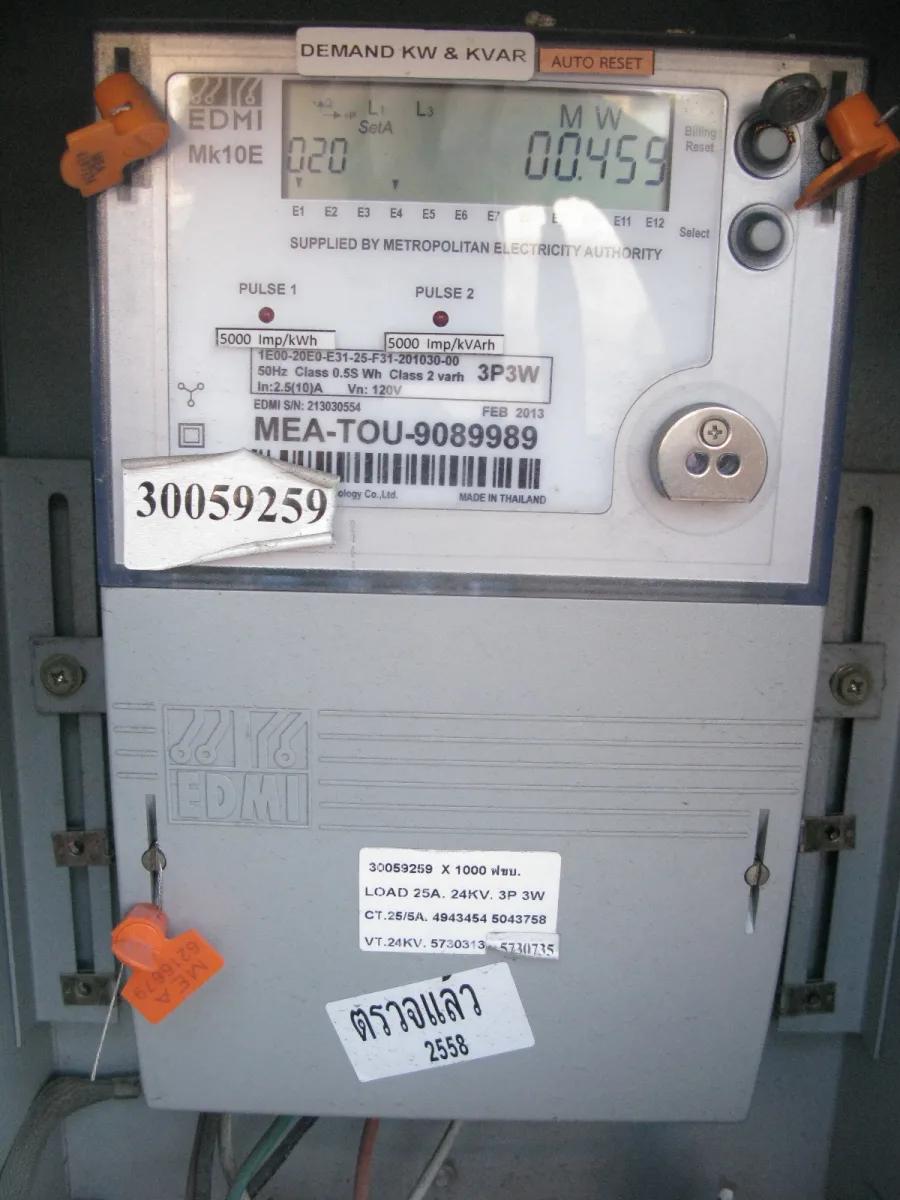
A TOU (Time-of-Use) meter is a digital meter that records units per time window — how many On-Peak, how many Off-Peak. Its display therefore cycles through several registers: the total, then each time-window's units, on rotation. Each register carries a code/symbol that varies by meter model, so the reliable way is to check that model's manual or ask the utility — don't guess which screen is which window.
Per-window rates are at the TOU on/off-peak schedule. Don't have a TOU meter yet but want one? See how to apply for a TOU meter (PEA/MEA). And if you are not sure which time window each of the two registers on the meter belongs to, read what On-Peak and Off-Peak mean and what time they run.
From Reading to Baht (Worked Example)
One formula: units used = this reading − the previous reading.
Small meter example (with decimal window)
Start of month the meter shows 7660.5 → read 7660 (ignore the decimal). End of month it shows 7780.8 → read 7780. So this month you used 7780 − 7660 = 120 units (kWh) — per the MEA reading guide.
Large meter example (read all 5 digits)
A 30(100)/50(150)A meter has no decimal: start 75650, end 76750 → 76750 − 75650 = 1,100 units used.
Got your units — want the baht? Convert with the tiered formula at how to calculate your home bill, or let the bill analyzer do it automatically. Latest per-unit rates by customer type are at how many baht per unit 2026 — and if your units are steady but the bill still moves, the reason is usually the Ft charge, adjusted every 4 months.
Check Your Meter Against the Bill (No./CA + Billed Units)
Once you can read the meter, run these 3 checks:
Confirm it's YOUR meter — the meter body carries a nameplate/sticker with its serial (No.). Match it against the meter number printed on your bill (the field's name and position vary by utility — check your own bill), so you're not paying for the room next door.
Compare the previous reading on the bill — the bill shows the previous and latest readings. Check they roughly match your own notes (small gaps are normal since the official reading date differs from yours).
Self-read at month-end and compare billed units — your own units (current − previous) should be close to what the bill charges. If they're wildly apart, photograph the meter and contact the utility (MEA 1130 / PEA 1129).
In a rental room/dorm where the landlord reads a sub-meter for you? All the more reason to read it yourself — note the start and end-of-month figures, then run your units and the charged per-unit price through the rental electricity checker to see if it exceeds the cap. The rental-electricity cap law (about 4.88 THB/unit under the OCPB's official 2025 calculation method) is explained at dorm electricity law 2026, with the bigger picture at what rental rooms should pay per unit.
Do MEA and PEA Meters Read Differently?
No — the reading method is identical; only the service area differs. The MEA (Metropolitan Electricity Authority) covers Bangkok, Nonthaburi and Samut Prakan; the PEA (Provincial Electricity Authority) covers the rest of the country. Both are migrating dial meters to digital, and household rates are the same nationwide — details at PEA vs MEA, is the bill different? and the full current rate tables at the current electricity tariff.
About this page
Compiled by the CapSolar team, led by Frank Lee (Founder). The reading rules follow the Metropolitan Electricity Authority's (MEA) public guide; the digital code table follows commonly documented references and should be checked against your meter model. This page is general information, not personal advice — for case-specific questions contact the utility (MEA 1130 / PEA 1129).
FAQ
You Can Read the Meter — Now Check You're Not Overcharged
Take your reading to our free tools: renters can check the per-unit cap; homeowners can break the bill down line by line.